


How Roblox’s new safety features for under-13s support young players and creators and parents
How Roblox’s new safety features for under-13s support young players and creators and parents.
Roblox is incredibly popular with over 70 million daily young users playing worldwide, it combines creativity, social interaction, and gaming in one platform. Youth/young people can explore different virtual worlds, build their own games, and join other players in unique and creative experiences. It allows them to engage in a variety of play styles—ranging from adventures to role-playing—while also giving them a chance to interact with friends or new players online. The platform’s versatility, especially the freedom to create and socialise, makes it appealing to younger users.
In response to concerns about online safety, Roblox recently announced a set of stricter safety features for children under 13, aiming to provide a more controlled and secure environment. From 18 November, under-13s will also be barred from accessing “social hangouts”, which are online spaces where players can talk to each other by text and voice.Similarly in November, developers on Roblox must label their experiences based on age-appropriateness, and if they don’t complete these ratings, their content won’t be accessible to younger users. Roblox will also restrict certain interactive features, such as open chat and unmoderated user-generated content, for players under 13. Parents will have more control over these features and be able to monitor or adjust permissions, which is intended to help protect children from potentially harmful interactions and content on the platform.
In the past, young users have raised concerns about seeing worrying content and suffering abuse.
For parents, there are some helpful strategies to support safe online experiences. First, setting clear guidelines with children about internet use, including discussing the type of games or social activities they engage in, is crucial. Roblox’s parental controls can help ensure that children stay within age-appropriate environments. Additionally, being open to conversations about online experiences can empower kids to share their online activities, and educate them on reporting or blocking any inappropriate behaviour. These measures are designed to give parents more oversight, aiming to foster a safer, more positive digital experience for kids as they explore platforms like Roblox.
Sources:
- VGC
- Benzinga
Here is HOW we can start and/or continue keeping children safe on Roblox as both players and budding developers. It involves a mix of technical controls, parental guidance, and proactive conversations about online safety. Here are some practical tips to ensure they stay protected:
It is our parental responsibility to ensure our children read the community guidelines and Experience Guidelines and Age Recommendations .
1. Use Roblox’s Parental Controls and Age-Appropriate Settings
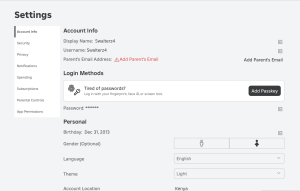
Account Restrictions: Enable Account Restrictions in your child’s account settings, which will limit communication to friends only, disable chat features, and restrict access to age-appropriate games. For children under 13, Roblox has additional settings that restrict interactions to avoid exposure to potentially harmful content.
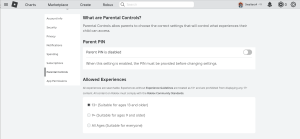
- Content Maturity Settings: Set content ratings for your child based on their age. Roblox has introduced tags for experiences (like “All Ages,” “9+,” and “13+”) to help filter games that are appropriate for their age group
Benzinga.
2. Guide Them in Safe Social Interactions- Teach Online Etiquette: Educate your child about respecting others online and encourage them to avoid oversharing personal information. Remind them to keep details like their real name, location, and school private.
- Reporting and Blocking Tools: Familiarise your child with Roblox’s reporting and blocking features. Encourage them to report any inappropriate behaviour or content they encounter, and assure them that reporting is a safe way to protect themselves and others.
3. Monitor Their Activity on Roblox
- Regular Check-Ins: Periodically review your child’s friends list, chat history, and the games they play. This can provide insights into who they interact with and the kind of content they’re engaging in.
- Roblox Family Controls App: Roblox recently introduced tools that allow parents to monitor their child’s activities more closely, giving insights into game time and friend lists from a parent’s own device.
4. Encourage Safe Game Development Practices
- Teach Cyber Security Basics: If your child is interested in developing games, teach them the basics of online security, like not sharing passwords and avoiding third-party plugins that may be harmful.
- Supervise Development Tools: Roblox Studio, the platform’s development tool, is powerful and can connect with external assets. Be sure to supervise any external files or assets they download to avoid risks associated with malware or inappropriate content.
5. Engage in Open Conversations about Online Safety
- Discuss Potential Risks: Talk about risks they may face online, like cyberbullying, inappropriate content, or scams, and give them strategies to respond. For instance, encourage them to ask for help if they’re uncomfortable or unsure about something they see online.
- Empower Them with Digital Literacy: Teaching children to critically evaluate online interactions and media content helps them make better decisions, not only on Roblox but across all online platforms.
6. Stay Updated on Roblox Policies and Safety Features
- New Safety Updates: Roblox periodically updates its safety features, especially for younger users. Keep yourself informed about new safety measures and adjust your child’s settings as these updates are released to maximise protection.
- Join Parent Forums and Resources: Roblox’s Parent Hub and other community forums offer advice, tools, and shared experiences from other parents, which can be helpful in staying updated and proactive.By combining these tools and tips with ongoing guidance from Eveminet, your preferred Family IT Consultants, and open discussions, you can help your child enjoy a safer, more positive experience on Roblox as both a player and a creator.


